# What is CustomerGlu?

{% hint style="info" %}
CustomerGlu Helps Enable all The Digital businesses to Create Game-Like Experience without a Developer or Coding
{% endhint %}

## Frequently Asked Questions

{% content-ref url="/pages/qNZsEq29ZnLDvjc1V2nq" %}
[Campaign Related FAQ](/guides/campaign-related-faq)
{% endcontent-ref %}

{% content-ref url="/pages/fO1UDFOTdTlGcw7O1lxV" %}
[Product Integration & Onboarding FAQ](/guides/product-integration-and-onboarding-faq)
{% endcontent-ref %}

{% content-ref url="/pages/EcFPnYbhscHDorPPYEIc" %}
[Developer FAQ](/guides/developer-faq)
{% endcontent-ref %}

{% content-ref url="/pages/GSVsFBGXmRgSgKPhrzq2" %}
[Policies and Security FAQ](/untitled/policies-and-security-faq)
{% endcontent-ref %}

{% content-ref url="/pages/pzQ0WJoqMK3tku91n6Tf" %}
[Customer Support & SPOC](/guides/customer-support-and-spoc)
{% endcontent-ref %}

{% content-ref url="/pages/kPVbh4bhRxNp5nQWJXPl" %}
[Plans & Pricing](/guides/customer-support-and-spoc/plans-and-pricing)
{% endcontent-ref %}


# Campaign Related FAQ

#### Why do I need a demo?&#x20;

Our demo demonstrates all features of the CustomerGlu. You could easily learn how to create and publish campaigns and analyze metrics. Detailed integration manuals are also available in our demo.

**What are all the available campaign types on the dashboard?**

We currently have the following campaign types on the dashboard :&#x20;

1. Spin the Wheel : User gets reward based on the probabilty set by admins.
2. Daily Spin the Wheel : User gets fixed amount of chances daily to spin the wheel for the scheduled amount of time.
3. Quiz : Quizzes have questions with a definite right or wrong answer – and each user gets a final score.
4. Personality Quiz : Give each user a result that’s based entirely on how they answered the questions.
5. Survey : Used to gather data/opinions or feedback from the user.
6. Streak : Gets user to login/complete an activity daily for n number of days.
7. Slot Machine : Probability based game type
8. Gift Box : Probability based game type
9. Scratch Card : Probability based game type

#### Which Campaign model do you suggest I choose?&#x20;

That depends on your company requirements, we offer many campaigns that you can choose from according to your necessities.

**Can multiple campaigns be linked in a single user journey?**

Yes, multiple campaigns can be linked together to form a certain user journey. Eg. Completing a multistep can lead to a scratch card or a streak can have users spinning a wheel daily for n number of days.

**How are the user journeys implemented for acquiring new customers, collecting their data and registering them as a loyalty member in the program once they play the game and submit their information(mobile/email)?**

For non-logged in users, we can toggle the visitor prompt which appears at the start of creating any campaign.

![](/files/t1V3yEAXziruWrULAfgg)

We can then set up the visitor prompt in the campaign configuration itself as shown in the screengrab below.

<figure><img src="/files/rxh4XLO9zr8VYnAWDLl3" alt=""><figcaption></figcaption></figure>

#### Will you take feature requests from us and How long will it be before the product team reviews my idea?&#x20;

Yes, We take feature requests from our customers. Items will be reviewed on a weekly basis. We take the top requests and update the status where appropriate. Make sure your ideas are clear and concise so that we can prioritize. Also, be sure to prioritize your own requests too - that way, we will know if a particular request is important to you.

#### Can we give badges at the end of an Educational quiz instead of rewards like any other quiz?&#x20;

Yes, we can add Badge as a reward icon.

\
**Can the game parameters be changes once the game is live?**

Each campaign is partially editable after it goes live :&#x20;

1. Campaign Designs and Banners can be changed
2. Activities and Rewards can not be changed

**Can a single game be set up in different languages?**

Yes, we do support different languages. However, different campaigns need to be set up for different languages over the dashboard. A single campaign can be duplicated and content (text and banners) can be modified in different languages.

**Is there any standard report available for every game that is configured which gives the all user information straight away?**

Yes, each campaign has a report linked to it which will have all the user info required. Eg. Number of users opening the campaign etc.

#### How can I view the reports?&#x20;

Hover over the campaign from the dashboard and click on "view report".

#### Hey! Does slot machine accept reward probability in decimal?&#x20;

Yes, it does accept reward probability in decimals


# Product Integration & Onboarding FAQ

#### How can we build it in our app?&#x20;

It is very expensive for companies to build it themselves - and most of them never do, that's why we decided to solve it for everyone with CustomerGlu.

#### What OS does CustomerGlu support? Does it offer support to both Mobile and Web?

&#x20;We support Android, IOS, and Windows too, Yes we support both Mobile and Web.

#### What is the Integration Process?&#x20;

Here is our Developer Demo Documentation for the Integration process

[https://docs.customerglu.com/](<https://docs.customerglu.com/&#xA;>)

#### What is a Reward ID?&#x20;

A reward ID is an internal identifier that we have. You don't have to worry about this.

#### How do we send the User Id?&#x20;

user ID will be sent to us during the device registration. So the way the whole flow works is that at the app load we are making the very first API call which is device registration. As part of the documentation, you will notice that there are four steps.&#x20;

Step 1:- Is to load the UI.&#x20;

Step 2:- Is sending events.&#x20;

Step 3:- Is configuring nudges and&#x20;

Step 4:- Is configuring the rewards.

To understand that where do we get the user ID, As part of the first call, which is the UI loading part, we make two API calls, one is registering a device and 2nd is loading campaigns as part of the registered device. You supply the user ID to us. That is the exact user ID that will be used for calling the web.

#### Do we have any testing environment for this?

&#x20;We can give you a postman collection which you can pressure to trigger this weapon.

#### How will you basically receive the Secret?

You can send the secret by encrypting it using GPG or you can use this tool called a key base. You can send it to us over the key base. The main idea is that the key should not be shared in clear text over the Internet. That's all you can even just zip it in a text file and a password to it and you can share that with it.

#### If you are setting up multiple campaigns and each campaign has a coupon as a reward. So hope that metadata is also going to get configured accordingly?

&#x20;Yeah, absolutely.

#### Can we have three-four rewards against the campaign basically one campaign is scratch a card and you get a coupon and the coupons that we are giving out is not one coupon, which is let's say having a probability of twenty percent?&#x20;

Yeah, that's exactly how it is. We have a column in the input sheet as Winning chance Percentage:- Chances of winning reward by the user For example, 1- 100% is the chance of winning If there are 4 variants with a 1 as a win ratio - that would mean there is a 25% chance of winning any reward variant. So You can fill it as 25% 25% 25% 25%, if there are three variants, you can fill it as 30% 40% 30%.

#### Is this coupon request process will be real-time?

&#x20;Yes, This will be real-time. We also have a retry mechanism where let's say in a case where the requests fail, we do retry them with an exponential back off. We have those mechanisms in place.

#### How many trails are there?&#x20;

We do try it three times. And we also have this mechanism where at the end of the day, let's say after three retries, the request which is still failed, We can expose an endpoint to share this, or we can just try to do it at a particular time in the evening, or at least even then they are failing. We will send a report to you over a secure channel that these requests are failing so that we can look deeper into this.

#### How to integrate my App with CustomerGlu?&#x20;

CustomerGlu provides an APK to be integrated within any partner's app or mobile web. We also provide a detailed manual for integration.

#### How many days does it take to complete the integration process?&#x20;

To the best of our knowledge, the process of integration takes 1-10 Business days to be completed.

#### Can you help me with the UI links of all the existing games like scratch, slot, spin, memory, quiz, roll a dice, gift box?&#x20;

Yes, certainly can. please use this link on mobile: [https://games.customerglu.com/wallet/?token=TOKEN<br>](<https://games.customerglu.com/wallet/?token=TOKEN&#xA;>)Apart from Roll the dice and gift box, everything else is in this wallet. Our team is working to add these games to the latest version too.

#### I have a need for custom Campaigns that are specific to my business. Can CustomerGlu help me in any way?&#x20;

Sure, we have developer partners who can help you. Please feel free to contact us at <cs@customerglu.net>

#### Can we see the events being sent by us on the dashboard?

&#x20;No, you cant see the events in your dashboard. But, we can confirm that we are receiving the events by checking internally.

**We didn't receive Webhook request ?**

Please Check the url shared.

**We got an Unauthorized error while sending events?**

Please check the request body, url and Auth headers.\
\
**What is the  SDK size for Android OS?**\
250 kb

**What is the  SDK size for IOS?**\
2 MB


# Developer FAQ

#### When does your analytics gets refreshed?&#x20;

Reports are refreshed every 24-hours.

**Where can we find reward webhooks for campaigns?**

Please follow the instructions below to set up the Reward Webhook :&#x20;

1. Go to the Dev Console.&#x20;
2. Navigate to the 'Integration' section.&#x20;
3. Under 'Webhook' and select 'Reward Webhook.'&#x20;
4. There you can add the webhook URL.

For more information about the Reward Webhook in this [documentation](https://docs.customerglu.com/advanced-topics/configuring-webhooks/rewards-webhook), and the documentation for the Reward Webhook Schema can be found [here](https://docs.customerglu.com/schema/webhook-schema#reward-webhook-schema)

**We created two campaigns in the dashboard but can see 4 cards in the wallet?**

The 2 extra cards are present because the rewards from older campaigns have not expired, the reward expiries are different from the campaign schedule, and can be set from the dashboard.

#### If the user does not open the banner (CTA), will his progress start if completes an activity?&#x20;

You can choose to have an explicit "Accept" button for a campaign to start the activity tracking, or by default once the API call for getting the campaign url is made, we will start tracking the activity regardless of the user having opened the program.

#### Can you share data through Metabase as API?&#x20;

Yes, We can share the data as a Reward webhook (i.e. who played, what they won, etc.) with you. (API work is in progress)&#x20;

#### Can we show a user who completes the week 1 activity the next activity?&#x20;

No, We cannot trigger the week 2 campaign, if the users complete the week 1 campaign (for now).&#x20;

#### How exactly will the coupon (Any of our product) integration happen? How does the infrastructure work?

We act as a video layer you'll share coupons with us, we'll just act as a presentation layer to run the game and unlock the coupons and call a webhook to your backend with user and reward information. This reward could be anything that can be processed at a service deployed on your servers.

#### How does personalization happen? Can we target different categories, store types, user campaigns?&#x20;

(User segmentation) We expect user attributes while a user is being registered, which we can then use to segment a set of users by setting some filters.

#### What is the call of action for users?&#x20;

We support 3 methods to load programs:&#x20;

In-app prompts&#x20;

Referral link shares&#x20;

Banners that open programs

Inside programs, we can deep-link to specific app pages.

#### How to push notifications?&#x20;

Deeplink integration We support FCM and APNS and capture the device token during registration. To know more please read: <https://docs.customerglu.com/nudges>\
We can also send nudge payloads to a webhook.

#### Reward webhook, what can we configure in this?&#x20;

Reward webhook payload can have some custom details, which can be set while creating a reward, apart from the standard properties. Please refer the documentation for more information:\
<https://docs.customerglu.com/rewards-webhook>

#### Will the coupons be created already or be created when we make a call?&#x20;

Coupons are already created, we will unlock the coupon. We support fixed and Dynamic coupon codes as well.

#### How will the user see their rewards (Coupons, Point, etc)?&#x20;

From our reward wallet.

#### If we go from staging to prod, will the games be affected? We're planning to go live with a few segments (Web and ios), should we move to prod when we go for 100% of the users or should we do it now?&#x20;

The only thing changing with the prod environment is the dashboard credentials, you will be given credentials for the prod env dashboard and you just have to make sure the exact same process that works for you in the current dashboard, remains unchanged on the prod dashboard.

#### Is there a way to send nudges event to backend directly?; say the customerglu platform pushes nudges/notifications to Us and then We pushes them to clients?&#x20;

Yes, That is possible, you can give a nudge webhook, similar to the reward webhook, and we will be pushing nudges to that webhook, instead of the End-User Device.

#### How can we trigger the gratification for user B?&#x20;

you can do it from your end by any of the following:&#x20;

Clicking the claim now button on UI.&#x20;

Sending CLAIM\_REWARD event, similar to all your own events that you send.

#### While sending event data, event\_id is not compulsory?&#x20;

Yes, It’s not compulsory, only the user\_id, event\_name, and event\_properties are required.

#### Reward webhook will hit once for a user for a single quiz, right?&#x20;

If a reward is won then yes, If the reward is not won then the webhook won't be hit (NoReward)\
\
**what is the token expiry time and what response do you send when we make request using expired token?**\
Token expiry is 24 hours, on using expired token, you’ll get 401 error with the following payload: \
{ "success": false, "message": "Invalid Token" }

<br>

![](/files/aRVLjQYIfTIQPBgJw5hl)

**What's the difference between userId and anonymousId? Can I use the same unique user id in both?**\
anonymousId and userId are both used to uniquely identify users and maintain states of their campaigns/rewards. \
Generally the anonymousId property can be used for guest users- who don’t have a userId assigned yet And on sign in/up by the user, userId can be used.<br>

#### Does CustomerGlu have a static-ip-address for the source of web-hook events?

Yes, It's  `13.126.37.189`&#x20;


# Pro Tips

#### Header keys are case sensitive


# Customer Support & SPOC

### We give support from Multiple Media Channels like Slack, Hangouts, and Whatsapp. <a href="#id-9o8y0qwa859l" id="id-9o8y0qwa859l"></a>

#### We're available to help at any time by Email, Hangouts, Slack and Telephone, but please remember that after-hours support is reserved for P1 or "System Down" issues

{% hint style="danger" %}
Should you require assistance with such a P1 issue outside of normal business hours (9:00 am to 5:00 pm, Monday to Friday, except on holidays), please use "P1" in the subject line of your email. We'll respond within two hours. Refer to the following table for information on the various support options and priority levels:
{% endhint %}

{% hint style="info" %}
P1, Critical Priority "P1" or "System Down"&#x20;

P1 is used when the end user UI is not working for many users( >20% of users) Initial target response: Two (2) hours after ticket submission.

Target resolution or workaround: Priority reduced to P2 within 12 hours.
{% endhint %}

{% hint style="info" %}
P2, High Priority

"P2" Campaign update requests, Reports not showing correct data&#x20;

Initial target response: Eight (8) hours from ticket submission.

Target resolution or workaround: Within seventy-two (72) hours.&#x20;
{% endhint %}

{% hint style="info" %}
P3, Normal Priority&#x20;

"P3" New campaign launch requests, Reports are not refreshed on time&#x20;

Initial target response: Within 1 business day via email.

Target resolution or workaround: Within five (5) business days.&#x20;
{% endhint %}

{% hint style="info" %}
P4, Low Priority&#x20;

"P4" ‎Minor issues with the dashboard. Product enhancement or feature requests.&#x20;

Initial target response: Within two (2) business days via email; updates provided as necessary.

Target resolution or workaround: Within five (5) to ten (10) business days.
{% endhint %}

#### Target resolution times are goals. Depending on the volume and severity of tickets submitted, response times and time to resolution may vary. Occasionally, an issue may need to be escalated to our engineering team. In such cases, it may take more time to resolve the issue.

### 💡 For escalations - Reach out to [cs@customerglu.net](mailto:satya@customerglu.net).


# Plans & Pricing

**How many different plans are available?**

We have a variety of plans, features, campaigns, and thousands of templates you can select from, please get on a call with our sales and product team to know more about our plans and prices.

**Are there long-term contracts?**&#x20;

No, we don't force you into any long-term contracts. Our best price is available as an annual subscription.

**Do you offer any discounts for startups?**&#x20;

Yes, please get on a call with us stating your requirements.

**How to get a new invoice?**&#x20;

Invoice will be automatically sent to your email address based on the usage for that month or year (if you are in our annual plan). If you have not received or have misplaced the invoice, please email us at (<cs@customerglu.net> )

**Does your subscription automatically renew?**

Your subscription renews automatically after a 30-day term (monthly) or 12-month (annually).


# CustomerGlu Walkthrough Videos on Games

Dashboard Games Walkthrough Videos

## **Walkthrough Video of Surveys**

{% embed url="<https://www.loom.com/share/bf1345373e3d475abc05b14dc646f24f>" %}

## **Walkthrough Video of IPL Trivia Quiz**

{% embed url="<https://www.loom.com/share/a8e6f771145348fbb594febd9ecd5d9b>" %}

## **Walkthrough Video of Personality Quiz**

{% embed url="<https://www.loom.com/share/9662b02079e844aaa90a4034a363b7fa>" %}

## **Walkthrough Video of Quiz**

**Quiz Part 1**

{% embed url="<https://loom.com/share/bfcbc7e20e074f9ab7da7a940452c5bf>" %}

**Quiz Part 2**

{% embed url="<https://loom.com/share/95d9def0f3ce4141a0f1349d6726a24a>" %}

**Quiz Part 3**

{% embed url="<https://loom.com/share/8453ddc3cd7a46fb88f45957187a7add>" %}

## Walkthrough Video of Spin the Wheel

{% embed url="<https://www.loom.com/share/98087135e58c4c7cb4da1fa2a703003f>" %}

## Walkthrough Video of Daily Spin the Wheel

{% embed url="<https://www.loom.com/share/4f51ce4feaaf4d3c8ab157885db27b93?sid=93d0d941-92c8-4ff1-9c94-b3300725a31b>" %}

## Walkthrough Video of Scratch Card Campaign

{% embed url="<https://www.loom.com/share/a7bc24a9812e4047bf47f5b64450fd0b>" %}

## Walkthrough Video of Gift Box Campaign

{% embed url="<https://www.loom.com/share/a338ea534a73481b9bc5cf79ed1b316b>" %}

## Walkthrough Video of Slot Machine Campaign

{% embed url="<https://www.loom.com/share/535be4dd484643a5ac0fdd381fe69a82>" %}


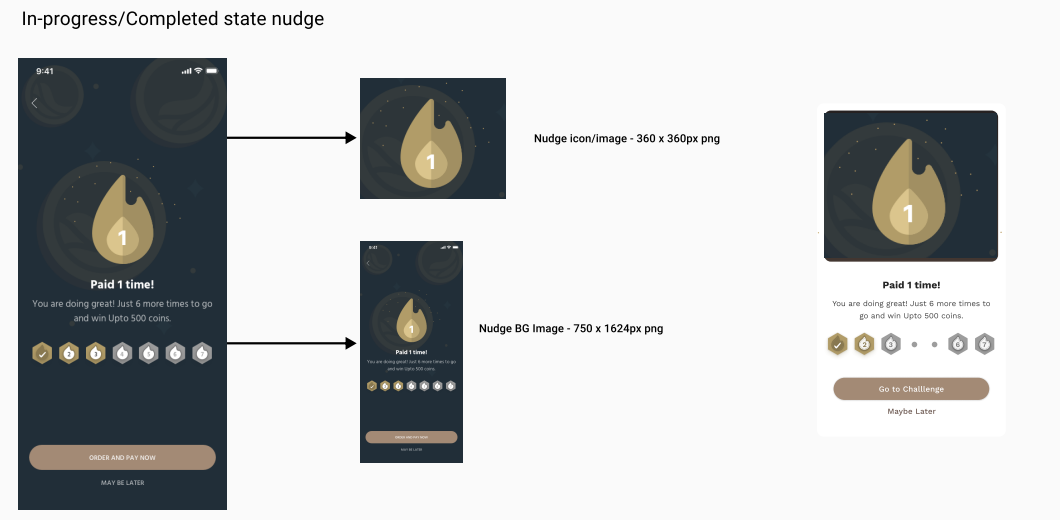
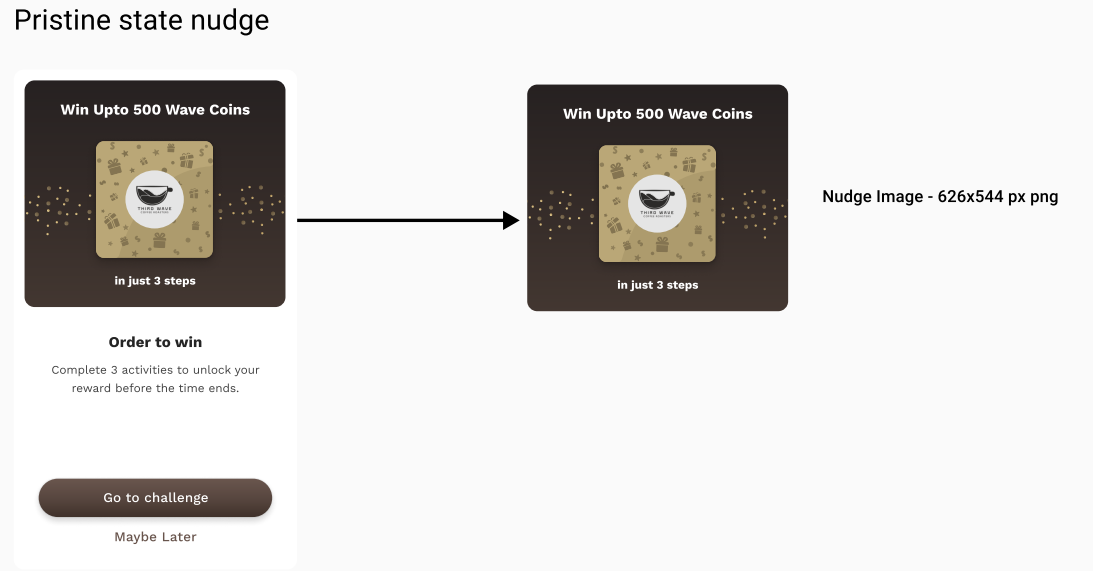
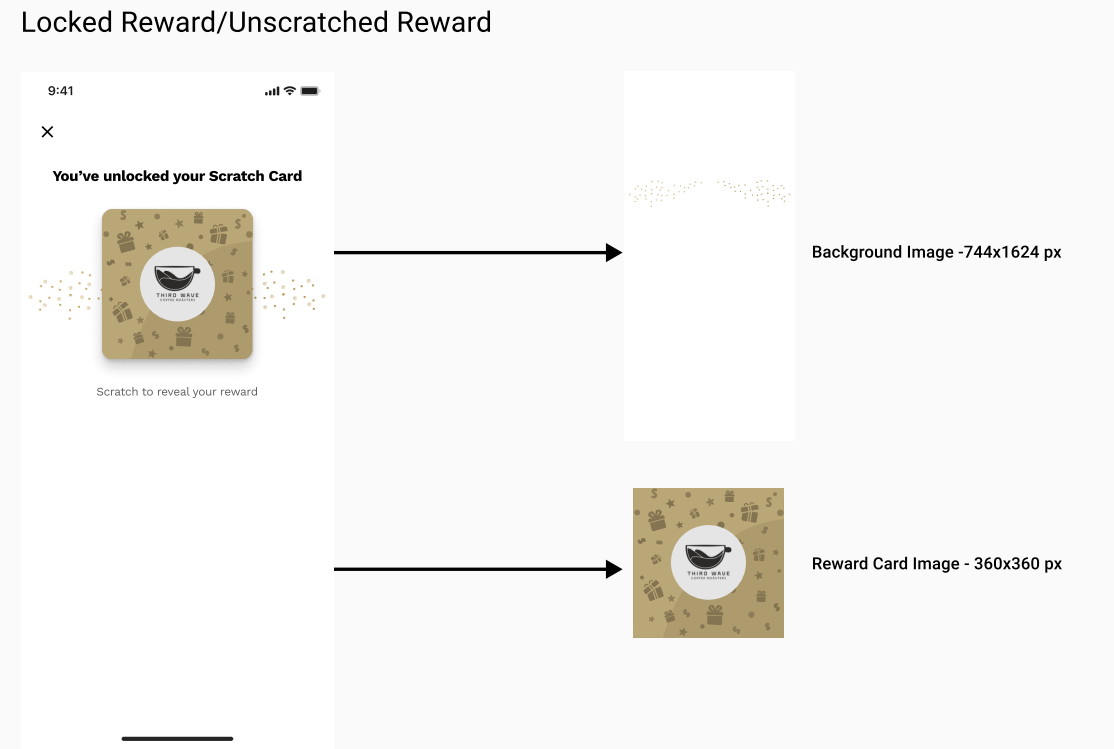
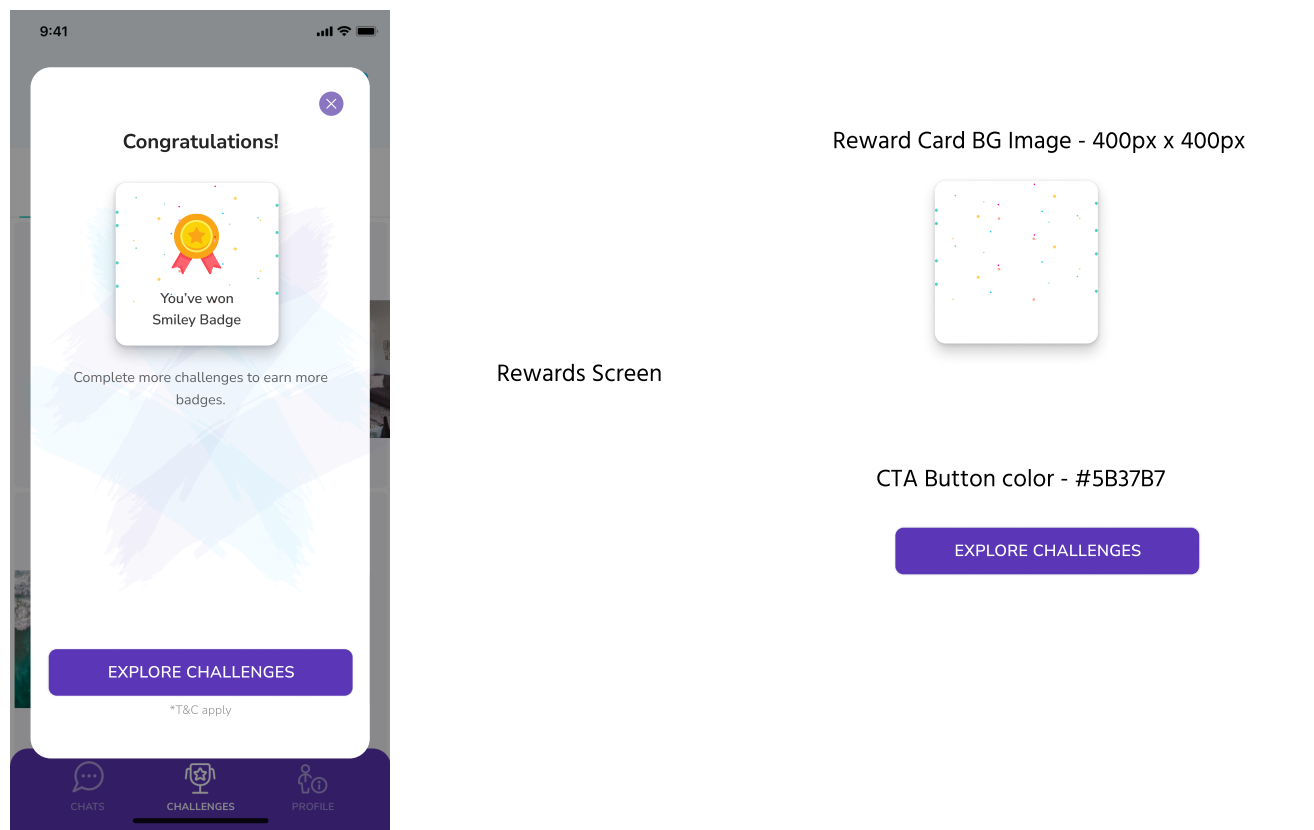
# Asset Example and Sizes for Different types of Games

CustomerGlu is the best way to quickly gamify your product!

1. ## <mark style="color:green;">Streaks</mark>

<figure><img src="/files/rPifLxptq2HMnCqe01sL" alt=""><figcaption></figcaption></figure>

<figure><img src="/files/4lU6jmggwTI5R8HgBmUx" alt=""><figcaption></figcaption></figure>

<figure><img src="/files/9Sl0nZeMwhgsgt87rqJD" alt=""><figcaption></figcaption></figure>

<figure><img src="/files/r7kUvRMxkeczDvkPpH1G" alt=""><figcaption></figcaption></figure>

2. ## <mark style="color:green;">Multistep Challenge</mark>

<figure><img src="/files/socZ4xbVu8vyzgF3lQ2d" alt=""><figcaption></figcaption></figure>

<figure><img src="/files/aSfOBhCtyF1j7qE0DN8b" alt=""><figcaption></figcaption></figure>

<figure><img src="/files/a8E8CXUyeNIVhvnzNpwd" alt=""><figcaption></figcaption></figure>

<figure><img src="/files/P3zJLrC65cxemqxoVszF" alt=""><figcaption></figcaption></figure>

<figure><img src="/files/gTKIEcxYxHfgaiHu7Eon" alt=""><figcaption></figcaption></figure>

3. ## <mark style="color:green;">Slot Machine</mark>

<figure><img src="/files/vmEtIuOtKCo2dLnmMu8z" alt=""><figcaption></figcaption></figure>

<figure><img src="/files/wfJhsMMMujiZYEuwO7sp" alt=""><figcaption></figcaption></figure>

<figure><img src="/files/7KFRlMxW2H2Am2PjF9Zs" alt=""><figcaption></figcaption></figure>

4. ## <mark style="color:green;">Spin the Wheel</mark>

<figure><img src="/files/bdbeyE7cRbk4CHFB30x8" alt=""><figcaption></figcaption></figure>

<figure><img src="/files/AoRzgVaAra6NEjQOiw7U" alt=""><figcaption></figcaption></figure>

<figure><img src="/files/faqOhbuOoPpQ49djIRS3" alt=""><figcaption></figcaption></figure>

### <mark style="color:green;">Nudges</mark>

### 300px x 300px<br>

<figure><img src="/files/tQgpisqzJPp63boV4Ua9" alt=""><figcaption></figcaption></figure>

### <mark style="color:green;">Wallet Banner</mark>

### &#x20;375px x 240px

<figure><img src="/files/HOXPoheA9SuwufrBICT9" alt=""><figcaption></figcaption></figure>


# SDK vs API

<table><thead><tr><th width="244.49528246466184">Functionality</th><th width="244.02037127471493" align="center">SDK</th><th align="center">API</th></tr></thead><tbody><tr><td>Loading the campaign and wallet</td><td align="center">Make a one-time call to load wallet and reduce number of network calls.</td><td align="center">Make call every time to load wallet.</td></tr><tr><td>Time to Integrate</td><td align="center">1 Day</td><td align="center">Multi-Day</td></tr><tr><td>Handling Button clicks</td><td align="center">Close, Open and Share handled directly by SDK</td><td align="center">Additional configuration required to bind webview events with native app</td></tr><tr><td>Registering a user</td><td align="center">Token expiry handling is in-built</td><td align="center">Developer effort to handle token expiry</td></tr><tr><td>Use third party messaging tools to load campaigns and wallet directly</td><td align="center">Yes</td><td align="center">No</td></tr><tr><td>Error handling</td><td align="center">Yes</td><td align="center">No</td></tr><tr><td>Load speeds</td><td align="center">500- 700 ms</td><td align="center">800 - 1000 ms</td></tr><tr><td>SDK Size</td><td align="center">250 KB for Android<br>2 MB for IOS</td><td align="center">NA</td></tr><tr><td>Display in-app nudges</td><td align="center">Allows you to run rich preset nudge templates like bottom nudge, interstitial etc along with configurable parameters Background Opacity.</td><td align="center">Sent as a data object which requires developer effort to configure how to display nudges.</td></tr><tr><td>Low internet availability(2G speed)</td><td align="center">Yes</td><td align="center">No</td></tr><tr><td>Dynamic entry points and banners(Upcoming)</td><td align="center">Yes</td><td align="center">No</td></tr><tr><td>Ready push Notification support for Firebase and APNS</td><td align="center">Yes</td><td align="center">No</td></tr><tr><td>Native loader customisability</td><td align="center">Customise Loader color, page etc.</td><td align="center">Not available.</td></tr></tbody></table>


# Inviting Team Members to the Customerglu Dashboard

CustomerGlu is the best way to quickly gamify your product!

1. Log in to the Customerglu dashboard from your existing credentials.
2. Go to the Settings tab that's on the bottom left of the dashboard page.
3. Click on Team Members.

<figure><img src="/files/BI0tub00GPJNBgJuFAin" alt=""><figcaption></figcaption></figure>

4. Enter the email of the team member you wish to invite.
5. Click Enter.

<figure><img src="/files/kxoCoB1rTu5Kx0D2fh3G" alt=""><figcaption></figcaption></figure>

6. The team member will receive an invitation email to join the Customerglu dashboard.
7. The team member should click on the Accept invite button in the email.

<figure><img src="/files/UuMDF5cNQLj7GNEnLdBd" alt=""><figcaption></figcaption></figure>

8. Once they click on Accept Invite, the team member will be redirected to the Customerglu dashboard where they will be prompted to create a password.
9. Once the team member creates a password, they will be entered into the Customerglu dashboard.
10. For future logins, the team member can use their email and the password they created during the invitation process.
11. Sometimes If the team member didn't get the access mail, you can simply send the magic link that is available in the Pending invites Section.\
    Click on Copy Magic Link and the link will be auto copied, just share the link with your team member, and the rest of the accessing process remains the same.<br>

    <figure><img src="/files/tx5LiBae5Y1CkIetzFTW" alt=""><figcaption></figcaption></figure>

Note: If you face any issues or need any assistance please contact our customer support team.

<br>


# Testing Campaigns on Internal Users

Best practices to test campaigns before going live for all users on Production Environment

Before launching a campaign live for the whole target audience, it is recommended to perform a dry run on internal users.

#### Create a segment for internal users

<figure><img src="/files/vSyP7BhqNYTd7LBHwFXB" alt=""><figcaption></figcaption></figure>

<figure><img src="/files/ycFsNcw0scNCaXOcZ0Pr" alt=""><figcaption></figcaption></figure>

#### Launch the campaign for the internal user segment

<figure><img src="/files/Wv5Kuci6eY2pdMj0eBRn" alt=""><figcaption></figcaption></figure>

Once the campaign is tested by internal users on the production environment, the campaign can be duplicated and launched for the whole target audience.

<figure><img src="/files/8mCLSg4x1y4BFbJOZsdr" alt=""><figcaption></figcaption></figure>


# User Lookup

Check User Activities,Segments he is part of, Wallet Preview and Logs

You can lookup a user's Activities, campaigns that they are part of, Activity logs, created at, Name, Device details, and all data related to that particular user from the Dashboard with the help of user lookup, you will find it here<br>

\
You can search for a user using a User id and click on search, I have used the user id as a test in this case. Once you click on search, you will find the details of the user like custom Attributes, Details, Segments he is been part of, and campaigns he is been a part of. \
\
\ <br>

<figure><img src="https://lh5.googleusercontent.com/-SqeEPwP9Wva0QrLBrsjJ21K3AmMN3wefc2-uAkoS6iEQu6WE3LIrfV5DbD7MjqFijhpXUnf4Ofc9qkhXV4V75Qca6ksT1-TU-Re6_GGxGMuOfSnlqYFktNO6M2tOw2qwu4049rdOtO4O8VipqWXpAA" alt=""><figcaption></figcaption></figure>

You can click on the Rewards page preview to check the wallet of this particular user.

<figure><img src="https://lh4.googleusercontent.com/Cf_NniKRoCuDWWj43IExus6mRVzA_rD-zSUzmTETzIzpBzXV7TYA0cl6tYipNqn840qLHBDPMZ0Uyv4IFXpS_c1mxG3588p1BA6XLwwbzhM7gtq5Y5CXzdgFDl5PWi8_Kuy-GZ_WRaIcU72UmxxUQM0" alt=""><figcaption></figcaption></figure>

\ <br>

You can Add or Remove the particular user to a Segment from Here, Under segments, you will find this option, select a segment from the dropdown of available segments and click on Add or Remove based on your Requirements.<br>

<figure><img src="https://lh3.googleusercontent.com/S1H2ihu34F_7FUah8-Nff-_7EQ-uOBn8fIF7o5h8oSMvZEJrW-S68X23Orl1Qk3gWrS6Tr7RQx-vdxp5d-lpxx1nEtsQLAtjibXqYqpW164CcAsiRzNA44GU_sHjTsO9tGJGmpqrMiwwL5rbatf0Fl8" alt=""><figcaption></figcaption></figure>

<br>

\
\
You can find the device details as well from here

<figure><img src="https://lh5.googleusercontent.com/sRkmcndPmM_fQPoBhxkNBb8RFxvuTuuMXfW_eRR2cKJZLsvkFTh9d3qGRn4pVxsxVGVfD3mZ8y40AeueUeucnzMs5aBXIS-O2_LSOmsQOWGiQO1YXG5pHFa7UdgRX6otKEviHUiE8U0KlIYwcmm0h14" alt=""><figcaption></figcaption></figure>

<br>

You can check the Activity logs for this user by clicking on Activity logs, you will find the logs like Interaction logs, Webhook logs, and Event Logs, by clicking on expand option, inbound and Outbound events for this particular user can also be seen at the bottom of the page.

<figure><img src="https://lh3.googleusercontent.com/M5Ik68FwzgKVKri3dJ7ITTlSBERFhLHGRR0rxq3gvHUN7nkpRRiWMZIE7v_Zgf0-WWi0m7bLPVQjvC7WcFwr_jOaHn43E0Jm5NqEwPn9C3T8mWLOTsyZf84F8aayTyxGUK6QixbdmxFaj5SHFvVFyiE" alt=""><figcaption></figcaption></figure>

<br>


# Segmentation

How to Create a Segment from the Dashboard

We can segment your users from the dashboard, Go to the Dashboard and Click on the Segments icon, 2nd Icon on the left side panel.\
\
Segmentation can be done in Two Formats\
1\. **You can upload a CSV with User ids by selecting Import from CSV option**\
\
\
\
Once it's uploaded from CSV it will be visible like this<br>

<figure><img src="https://lh4.googleusercontent.com/gQNqWcd54pHPFQLB1KX_t49duWmoZBZFQXhtSmdaZ7uEwGOfH49LKF8OKE9BsmAutOj0V6sPEaRlHXYU_kN2AEzDsVlthffxJksKdNOa9cXGi9O_NgXtpGT5IEd86k9MHPFoY8-5UTOH6do7WKSH7iQ" alt=""><figcaption></figcaption></figure>

**Or Create a New Segment from Scratch**

<figure><img src="https://lh4.googleusercontent.com/ROj3mj04yw-er4ESuFdJJo5ci5WVJVBlAEhI0YDyrTl_9YgPIcpEHS2A5xovt4cGm2Pn3bmP8RCvs_-aHJqwSgMfMgnNqvq_t2RhqkRwnlW3U5A2hnmJ96jtaX-nXFVzpkE9JrHXkH-W_MB_FTZDaVI" alt=""><figcaption></figcaption></figure>

<br>

The other option will be Creating a Segment from Scratch, click on Create a new segment, and you will find two options as\
\
**User Event, segmentation based on Events done by the user**\
**User Attributes, segmentation based on User Attributes of the user**\ <br>

**User Event**\
\
You can segment your user based on the activity they perform like the user did or did not perform an event\
\
These events are defined as System and Custom Events, we have given system events and their definitions here, these can be like Campaign expired, Campaign completed, etc.\
So once this event is completed by the user the user will get added to your desired segment.\
\
Custom events are events that you define.\ <br>

<figure><img src="https://lh3.googleusercontent.com/Drw_IazPyQvTPuXSeSMn3mXY0p4ItWupIDYnPsceBpWP7hzyvmH0rkV7QkNbrQxSfQI5fCRmbbJdDy_VEzfArqORsslKh-rEUFeVofGFziq15ZyigMh8-TNwqxrXP1zyEvLemXnHqjZEgDXAGc3kKwM" alt=""><figcaption></figcaption></figure>

This helps in chaining multiple campaigns together as well,\
Create campaigns separately and give the event name property as required.

<figure><img src="/files/f7DUzLqLzV5oZvNv7sC6" alt=""><figcaption></figcaption></figure>

\
\
\
\
Similarly, you can add an Exit Rule as well, like the user will Exit from the segment once the desired activity is completed.\
You can add multiple Exit Rules and Filters for the same segment.<br>

<figure><img src="https://lh3.googleusercontent.com/buUyGi9mfSWVY_xIPlZ4zYJj17UPDsBZydDr-Py6YicGpkR37pWuEL2qYtztJSg-mS6sFhmIFwhwZ5z4ZByYQKdyndd0hsX7jFfuAKeNGGcu0wriR2vqFEXkLDoIWZ6DzNIMlsyu2pqa5qXwvK-wxUM" alt=""><figcaption></figcaption></figure>

\
\
**User Attributes**

\
You can create a segment based on User Attributes like userid, firstname, city, phone, Age. etc\ <br>

<figure><img src="https://lh6.googleusercontent.com/W9hVQJ_Ac9rPM2EctACCo3Dz5ntfAUh-DyVtInNRQPdA1rujEQ93SgN8fTTHHz2TaLSu47PEbk0NwfGhLvjz1ch0y2n1zQMzA1lPZQlNVSDPbbzpX7sGCk5L7GAr7_PEB5DBvccNmMdQVdaaLZGu3tY" alt=""><figcaption></figcaption></figure>

\
\
\
**Example**

<figure><img src="https://lh6.googleusercontent.com/UI1PAy7CtimlaPzi2MitCMyzKET7IZFYUEjLG6vj0a2UMb5f8E_cHUetmFmesmLYSAJMLPA0WWZoYn78jIMGXIvd0xzTfbgdhEriky2Vuen51zemTx8JxUbP18Gmr6FLHFDqd90cIwwyHefq9uFPZ5s" alt=""><figcaption></figcaption></figure>

Suppose you want to run a campaign only for Banglore people, Go to User Attributes,\
Select “city” “is” “Banglore” (as shown in the screenshot below), and click on Save, the campaign will be visible only to those users present in Banglore.\ <br>

<figure><img src="https://lh4.googleusercontent.com/ciqIl6gUhb90F1PhQp3em-jV2l9nlxU4Vt6kL8mhDLEV4BETTLlunpIAMrBEo5_Pmnt5FXVBMZ-16kgnQ4kuf3QtQDu2dlNz3IpMOJ7uMZSIRK7ITWz5PnPeaTE-oUYmTFrPBkQLmgNGFY4SQfj83zc" alt=""><figcaption></figcaption></figure>

Once the Segment is created, give it a Name and Save it, once saved, you can see the list of segments under the segmentation tab on the left panel.

<figure><img src="https://lh6.googleusercontent.com/njtwunJ3noz-dCOKzv4_sVXjRCCxcmG2kSw0vADIY0Be2vT4u5xjUHCGK9cE9KBCPSkI7UAkfxpRt-2ujOR7lTMoZWkVi1Z4j8_lQ_AGC60jfIGkQvczWitWYKFBdogh9fhjGuQOp-WRyfjtHW929-U" alt=""><figcaption></figcaption></figure>

<br>

Similarly, you can see these segments and Apply them while you are creating a campaign, on the Audience tab, select Custom, then you can see all the segments you have created, you can select the segment and click next, then that segment will be applied to the Campaign.

<figure><img src="https://lh5.googleusercontent.com/tECIBS0-rBt81yHc0SfxouXh6YQezOa8ujFd69WO3DIOWvSdTbD8xF1iUriXZXZU6q1sNzcUIv1enSw09UnvUKYGJATnWc0rhZ3J6TZCf1IUPCwPj-qXW_3DHmicbXWonFlLBcmYBT6IHVZW_O6RNB0" alt=""><figcaption></figcaption></figure>

\ <br>

**Set a Control Group**\
\
Apart from Segmentation, you can see a toggle option called “Set a control group”\
This helps when you want to set the campaign for a control group of users on top of the segment or for All Users as well.\
\
Suppose you have set it for 30%, the campaign will not be visible for 30% of users and it will be visible for 70% of Users only.\
This helps in A/B testing.\
This works for All Users Segment or Custom Segment as well.<br>

<figure><img src="https://lh5.googleusercontent.com/_KJN4-fMp4ow3utuvMNc2QMsx534RfCC_i1Da1YlBfQeuTZEitsdSe4LE6rePCCEhzjDLovL0aj5VGkemALvopbDQyE9Mf-Q9FtwXXBpNIG1hPTmgB4sd-PL7lRkPsZdeUJEahwNFuRyHkIMbVycI1o" alt=""><figcaption></figcaption></figure>

<br>


# Reward Page Configuration

How to make changes to the Reward Page via the Dashboard

### **Accessing the feature**

1. To access the Reward Page Settings, Head to the Dashboard and click on the bottom left icon.

<div align="left"><figure><img src="https://lh6.googleusercontent.com/idqVaLKNrZyN2zC2kAWAWta9FDhb-4jKVdKr3UJZe6MzRCLtQB-RQUnQtFIuyUaIfYI1uoyB0QCfog6XktL7AHfE-M1ZwpZm2VObiHFAgkdtbmLH7LGIgqg59vmTgttb679SRRcKtL2N5-DvCdv6wdU" alt="" width="188"><figcaption></figcaption></figure></div>

<div align="left"><figure><img src="https://lh3.googleusercontent.com/jQMCkYd-_HybvAjyc1s7RkNGmvx_D49Doc7Idz9vTofPPfIC8Bizqw508ZXBpFwzr8cYdbb7st4Sx_yBq0uFzVcgCNEduVP_E2uCmzdBtbL9W_al3czw3Y187dehez4RoJLIqCNuGAZ-gtYGxnuu1Uo" alt="" width="375"><figcaption></figcaption></figure></div>

3\. Click on Appearance from the pop-up side menu to access the Appearance setting menu.&#x20;

4\. Click on Reward Page Settings to customise the appearance of the Rewards Page. (Image attached for reference)

#### ![](https://lh6.googleusercontent.com/8ZOsQ_FrzmD-QaXbHgP1drdOwiCbDI2isrv-1xEzbVFoHrgb0dtFwJlz4wnclMPxAlK9zZFUucJEBelcT54qhTFoARwI3_7OYdV8NMQCxG14D9TLLxJW4x1ZoA_HO7i0sqJSVfFB1frP5p14VMdwSC0)<br>

### Functionalities

#### Header

<figure><img src="https://lh4.googleusercontent.com/-1qJ5azz8lm1f19AqlXMGvPG6UGlNx0Pp8hEz5LSe2GfUJ-owgvQfiCKl6VBIW4EEr4AVNCUxDRrrEV-ydD6QoWB8_f9f8eZ4hB1FHpK00NbyUurrhmbeOxde6sA3QqfHkImkpUUrqnV0Qd_DB9CjQ0" alt=""><figcaption></figcaption></figure>

You can change the Banner Image & Back Button Icon by uploading your files/assets.\
You will be able to see the live changes on the right side of your screen.

#### Background

<figure><img src="https://lh5.googleusercontent.com/il7Bxprh53Pm3jrZRODYlG_lCa5Xi7qLt_5gP2tkMRvN_wvBp1SjSFBJt5mt1mTTu6xPwXpgS6PfnMgTd5PruduIV9sihGfUfcsKOKqjHUTZGRXrxIrJx0heWSnjteliIAKWMXBZeeZdYzHeiTUzMEY" alt=""><figcaption></figcaption></figure>

You can also change the Background between an Image or Colour.\
If you choose to go with an image, you can upload the file and see the live change on the right of the screen.

#### Sections

<figure><img src="https://lh4.googleusercontent.com/Mtdo2TxqrcG3s1nAM5RJnVszxYEw2-TwDIHD8yVsU-mjK6KS6AzQ2Tfw7XzaKgphkllMvNd2RGglliNUQbk116nOPGgC3-IQDJe4uNTvAYyzCFkz6_1pYirE0mItLSekiKvp-He-VGCrNg5aac4Xmas" alt=""><figcaption></figcaption></figure>

You can add Sections on the Rewards Page, In the image shared above, there is a Section named Prizes.

* You can change the name of the section by editing the Section Name.
* You can change the Section Background Colour as well as the Section Text Colour.
* You can opt between Horizontal and Grid Section Layouts.
* You can change the Section Content between Rewards or Programs.

#### Empty State Configuration

<figure><img src="https://lh5.googleusercontent.com/nq5l_dlxvmCsL6qGAkJ0FTUx5LGVX6t71uaUvspMhGKK_Q_npk3EiJxlPon09GWZ659AueyQwO2RJwEWgLAcDi7eIx0CbZ4ghA4WgkkaB0JDy882IWAxBi4Nsv0UHb6dZQ0t37FFAm9B91SuJEfDzS0" alt=""><figcaption></figcaption></figure>

You can configure the empty state of sections as well:

* You can choose an illustration for the Empty State
* You can edit the title and body for the Empty State message.

#### Filters

#### ![](https://lh3.googleusercontent.com/KFt8_FZTvHvxVL8XAP0eqIakiJjQvqFY-7iLGIrfuAmyK40GFxdS9VofALW-XbOKj4WRLr9ZF0nShk7Y-9ayku9sQiLiwLmeN5YLsHnBfSiCF0tgaDW6SvcpwLyDJZjdtuC1r-TUZ0CaYmQmuHfAJyY)

You can filter the cards visible in different sections well, this can help with use cases like, creationg a specific section for reward, quizzes, etc.

* You can choose between Unplayed Game Cards, Played Reward Cards or Unplayed Game + Played Reward Cards.
* You can also choose between the Campaigns Types you would like the user to see by checking the boxes and also choose to show the Expired Cards.<br>


# Debugger/User Data Deletion

Useful in testing campaigns from user perspective.

Go to settings (bottom left) on your dashboard and click you will find options → then click on Dev Console → there you will find the Debugger Option\
\
By using the Debugger you can get to see all the details of the user by giving their **User id** and clicking on Submit.\
\
\
\
You can see the User's details, like the segments they are a part of, Campaigns they are a part of.

<figure><img src="https://lh6.googleusercontent.com/00SgzEl-agnzzaoE2l1fFzW-lZwEE8vH7xq_kc6ewScUXjc_YRcqLx0P9Kbb26WCfbchWxUHAij8vy4xuwit-BjrWaYMS8nHVXj0FFJsXyhQY_HkXixLKt--IYWBkR3UJHHdc3T7U9-D1sEZx4xPWms" alt=""><figcaption></figcaption></figure>

#### &#x20;The best thing is you can Add or Remove a user from your desired segment,

<br>

<figure><img src="https://lh3.googleusercontent.com/5hyoz-k0z9R4WzWhnn8TUrlbnKfDDamxcHaRxfO1bDaC_UUuiFbrX87qLxODizwjvClPnF2h9g3AaAxPBskksyUV7xr3_46S-lhmtARU-Eg3TLhUpzd5s65m_X8u0kZ_M3Z7-cZ7nqaRvB_uPWPLy_A" alt=""><figcaption></figcaption></figure>

\
\ <br>

#### Campaign Preview

\
Scroll down to Campaign ops, Give the campaign id, and you can see the preview of that specific campaign and wallet preview as well from here.\ <br>

<figure><img src="/files/0K1VvGNv50Rr66XnCJVF" alt=""><figcaption></figcaption></figure>

#### User data deletion

Scroll down to Campaign ops, Give the campaign id, and click on Delete data, once you click on Delete User Data, You will see a pop-up asking for the Deletion of data for a single campaign OR Delete all user Data, based on your requirement you can proceed with your desired outcome.<br>

<figure><img src="https://lh4.googleusercontent.com/c30rb2_U7nhv4KxqHIszB-XugSTCRRMb4cpjCvY_TPskASwdnoDXenvuiqBH0rgKukyGNW3GMZiPJTgEWmxQvPotJcMMZQX3Ad9BI0SLRhoZWNi_wDBieGDQT_4b_jret_jvOWIj9EAy9aQ7OXA_DCk" alt=""><figcaption></figcaption></figure>

<br>

#### Note:- If you select Delete all user data, the user should be registered again, so we recommend you use the “Delete Data only for this Campaign” option if deletion is required for a specific campaign.

<br>


# Duplicating a Campaign

How to Duplicate a campaign between Environments or in the same Environment

Duplicating a campaign\
You can Duplicate a campaign in the Same Environment or to the other Environment (Staging/Production)<br>

<figure><img src="https://lh5.googleusercontent.com/w8YuB2EA-Xbqy3luYWj7rN0a7qMOxklrcDstVXUh8G6na1KA6mhC6Fisrj0Ip6-AsrAExPx3UQ9EFRC_jp_RO0n7FNc4QKWPx7qDXjxhcDnpMn4Lwz2E1TOhE_olcvuhzjRJe_AmkKGIhxN-dhBXh4Y" alt=""><figcaption></figcaption></figure>

* Access the Staging Environment: Ensure you are logged in and have access to the staging environment where the original campaign is created.\ <br>
* Navigate to the Campaign: Locate the campaign that you want to duplicate.\ <br>
* Open the Kanban Menu (Three Dots Menu): Click on the campaign to open its details page. In the top-right corner or bottom-right corner of the campaign details, you should see a "Kanban Menu" icon (usually represented by three vertical dots or lines). Click on this icon to open the Kanban Menu.\
  \ <br>

  <figure><img src="https://lh3.googleusercontent.com/4gWF7XCwDmESk-wCX9g3an38Ublg15RR2gDay7LHJi7sMMXEiop1V5JSw5FREUC6lE0UNlqMlo7pDIxz5T-xKU8-PGPWfyeUt-Y7-hZxGIRO3EyGl3ZXKueFbTFZVf_DxMY8WTM4idPJvy1JL8bz3lk" alt=""><figcaption></figcaption></figure>
* Select Duplicate: Within the Kanban Menu, you will find various options. Look for and select the "Duplicate" option. This will prompt a new dialog box to appear.\ <br>
* Choose Destination Environment: In the dialog box, you will see the option to select the destination environment for the duplicated campaign. Choose between "Current Environment" (staging) or "Production" environment, depending on where you want the campaign duplicated.<br>

  <figure><img src="https://lh3.googleusercontent.com/YEcM6mkfcrnpG1n_tavdQEGgkxLeFxW5Lq4qw7-KOgLM3rYiDYMMhXK27ShT_gVmA3texPQWK3VInwDHpZVHRY4mHzlqX37d1AcoTg6QA3L-dUysiZnzRKL9YBZ8guMSSwOP7CtZgFfGYMtwWab663o" alt=""><figcaption></figcaption></figure>

<br>

\ <br>

Confirm and Duplicate: Once you have selected the desired destination environment, confirm your choice and proceed to duplicate the campaign. The system will begin the duplication process.\
\
Once the Duplication is completed you will find the duplicated campaign on Draft State with a New Campaign Id, you can Edit it and take it live whenever you want.\
\
\
If you encounter any difficulties or have further questions, feel free to reach out to the CustomerGlu support team for assistance.<br>


# Get a Shareable Campaign URL

Steps get a Shareable Campaign URL

The Campaign/Program URL is a direct link to the specific campaign or program, allowing easy access for sharing or tracking purposes.\
\
Once the campaign is set to live, the Campaign / Program URL can be retrieved by the following steps.

Click Kanban Menu (Three Dots Menu)  > Select  Campaign URL > Click Copy URL (In Copy Program URL Pop-up)

<figure><img src="https://lh6.googleusercontent.com/jGCzrCmMXlprpW13JxpoVrGEXWyVGGz6KkxORmMD6mxWo3I3qULEwz4DmpgcjIVUzo57FQjfhFW1bycKQd7YtsL9cxKOwNQNnm2rWsByH95i8L9pF_3n0DmBimKCYO1BFM866mr4wtSrz1Gj1y6Y8A8" alt=""><figcaption></figcaption></figure>

<figure><img src="https://lh4.googleusercontent.com/_7ic8zGHHtFz1cHUlZ2rFJOrVDLo4V7ojszJ-llU39jcwwcmTm2QGgtmgDbjG8tXJHxR-oNxauDql-jb1Ds-A7ytzM1-ndy0qI8gX2wVXCcypJvTc0V-T0mnWcQC4NSIzlUpZfHgkbSZqlavFiKel-c" alt=""><figcaption></figcaption></figure>

<br>

\
\
\
**Also, set the toggle  "Allow anonymous users to view" active so that anonymous users can play it.**<br>

<figure><img src="https://lh3.googleusercontent.com/kQbKh13h1_nfk3chKB7cSxTx43QTIpy51zy9YwK6GREY1kXUpcvi-ln6nVCOX833oSq2nZzrQT0MYPlg7FN6BtcKta2191cpU_Zx62jsoarf9jgethQ8u486WA0DgQuvnbglHiAavHmZH_pDUDwU6cY" alt=""><figcaption></figcaption></figure>

<br>

Now that you have copied the URL, you can paste it into your preferred web browser or share it with others as needed. The URL will direct users to the specific campaign or program you retrieved it from.\
\
This link can be sent via E-mail, Whatsapp, In-App, and Embedded on Various sites.

\
\
If you encounter any difficulties or have further questions, feel free to reach out to the CustomerGlu support team for assistance.


# How to find your Writekey

To find the write key for Customerglu on your Dashboard, follow these steps:

1. Log in to your account on the Customerglu Dashboard with your credentials. Dashboard link <https://dashboard.customerglu.com/>
2. Once you are logged in,select the Environment from the top right corner as in Staging or Production,then navigate to the bottom left of the Dashboard. Click on Settings icon.
3. Scroll down to the "Dev Console" section and click on it.

<figure><img src="/files/UJAoPzIMyIesbWwgT2Rt" alt=""><figcaption></figcaption></figure>

4. You will be navigated to Dev Console page, Click on Integrations

<figure><img src="/files/WZ3TfB8HuBAyFd696MIb" alt=""><figcaption></figcaption></figure>

You will find the Writekey/ API Key on the top of the Integrations page.

<mark style="color:red;">**Note: The write key is a sensitive piece of information that should be kept private and not shared with unauthorized persons. Make sure to keep it safe and secure to protect your account from potential security threats.**</mark>


# Theme Settings

### ⭐️ Introducing Theme Settings

* CustomerGlu’s Theme settings feature allow teams to do a one time set up a style guide within the dashboard as per their brand guidelines to access within the campaign editor anytime they wish to launch a campaign.
* This allows teams to ensure even quicker customisation of CustomerGlu’s templates with their set-up style guides.

### 👉🏻 Creating themes with CustomerGlu’s theme settings

* Access theme settings by clicking “Appearance” on the user profile pop-up.
* You will then be directed to the theme settings page where you can start by creating your first theme!

<figure><img src="/files/NWPmjxlHSczjVC6Oy5MI" alt=""><figcaption></figcaption></figure>

### 🎨 Colour Setup for Your Theme

1. You can setup your colour palette to run campaign under 2 modes
   * light mode
   * dark mode
2. Your colour palette can consist of colour options for backgrounds, text, semantics and your brands primary, secondary and accent colours.

<figure><img src="/files/x6BuKbqh6rCbxUDNcSk8" alt=""><figcaption></figcaption></figure>

### 🅰 Typography scale Setup

1. Set up your typography scale within your theme as per your product’s brand guidelines.
2. You can create typography scales for different device breakpoints like **mobile, tablet and desktop!**

<figure><img src="/files/fLVqvYD602kNg2IXEz2I" alt=""><figcaption></figcaption></figure>

### ▶️ Button Styling Inputs

Styling inputs for your campaign buttons can also be configured in theme settings.

<figure><img src="/files/yQrt5o57vLaOcoEHHmaH" alt=""><figcaption></figcaption></figure>

### 💾 Save and Access Themes Within Campaigns

Your saved themes will be visible and accessible for future editing.

<figure><img src="/files/ax2D9KUeEnaqsGa3zf22" alt=""><figcaption></figcaption></figure>

### 👉🏻 Accessing Saved Themes within Campaign Editor

1. Saved themes can be accessed within the campaign editor.
2. Theme inputs for colours, Typography and Button Styling and be modified within the themes modal and saved.

<figure><img src="/files/CLkfVvNhPAqZ1CAnzhu7" alt=""><figcaption></figcaption></figure>

In case of a mismatch of colours from theme settings, we can simply select one of the preferred colours from the themes for background and text.

<figure><img src="/files/qRYoA8oyQ8Fb3pQzEY4Z" alt=""><figcaption></figcaption></figure>

Modifying text sizing within the themes modal

<figure><img src="/files/FtQv55FbM8VS1YJoT8Yf" alt=""><figcaption></figcaption></figure>


# Policies and Security FAQ

#### What is your support policy?&#x20;

Here at CustomerGlu, we do more than crafting software that solves your business problems. With our dedicated support team, we put equal effort into helping your business adapt to our product to reach your goals. Our support staff is diligent in recognizing issues, resolving them proactively, and assisting you in every step of the way.

#### Where will my data be stored?

Our Data servers reside in Mumbai Region (as of now).

#### How secure is my data with CustomerGlu?&#x20;

Many people ask us this question. And rightly so; We have invested a lot of time and money to ensure that your information is secure and private. We offer security on multiple levels, In fact, your data is more secure than walking around with it on a laptop or even on your corporate desktops.\
CustomerGlu employs state-of-the-art firewall protection on multiple levels eliminating the possibility of intrusion from outside attacks. We deploy anti-virus software and scans all access 24 x7 for suspicious traffic and viruses.

#### What is your Feedback Policy? How do you manage product feedback?

Here at CustomerGlu, We strongly believe that in order to make a great product, listening to our customers, team members and prospects is key. We use your feedback to identify the most important features, discover new ideas and understand your pain points so that you can get more value from our product in the long run.

We take product feedback and input very seriously. Here's how our Product team collects and acts on your feedback. Immediately: All new requests welcomed. After a maximum of one week: The Product team reviews feedback on a weekly basis. They are in charge of diving in each and every request. At that point, your request can either be set to the "Awaiting Feedback" status so that we can gauge demand, gather use cases, and automatically establish impact and value, or it can be declined. As the team goes through they'll update the status of each request so that you immediately know the outcome. If you reach out directly to our Support or Customer Success teams, they'll be able to look up ideas for you, but they won't have any additional information or provide an estimate for if or when your request will be developed.

## Privacy Policy&#x20;

This privacy policy("Policy") will help you understand how Marax AI, Inc.("us", "we", "our") uses and protects the data you provide to us when you visit and use [www.customerglu.com("website](http://www.customerglu.com\("website)", "service"). We reserve the right to change this policy at any given time, of which you will be promptly updated. If you want to make sure that you are up to date with the latest changes, we advise you to frequently visit this page. What User Data We Collect When you visit the website, we may collect the following data: Your IP address. Your contact information and email address. Other information such as interests and preferences. Data profile regarding your online behavior on our website.

#### Why We Collect Your Data&#x20;

We are collecting your data for several reasons:&#x20;

To better understand your needs.&#x20;

To improve our services and products.

To send you promotional emails containing the information we think you will find interesting.&#x20;

To contact you to fill out surveys and participate in other types of market research.&#x20;

To customize our website according to your online behavior and personal preferences.&#x20;

Safeguarding and Securing the Data Marax AI, Inc. is committed to securing your data and keeping it confidential. Marax AI, Inc. has done all in its power to prevent data theft, unauthorized access, and disclosure by implementing the latest technologies and software, which help us safeguard all the information we collect online.

## Cookie Policy&#x20;

Once you agree to allow our website to use cookies, you also agree to use the data it collects regarding your online behavior (analyze web traffic, web pages you spend the most time on, and websites you visit).

The data we collect by using cookies is used to customize our website to your needs. After we use the data for statistical analysis, the data is completely removed from our systems.

“Please note that cookies don't allow us to gain control of your computer in any way”. They are strictly used to monitor which pages you find useful and which you do not so that we can provide a better experience for you.

#### Links to Other Websites&#x20;

Our website contains links that lead to other websites. If you click on these links Marax AI, Inc. is not held responsible for your data and privacy protection. Visiting those websites is not governed by this privacy policy agreement. Make sure to read the privacy policy documentation of the website you go to from our website. Restricting the Collection of your Personal Data At some point, you might wish to restrict the use and collection of your personal data. You can achieve this by doing the following:

#### When you are filling the forms on the website, make sure to check if there is a box which you can leave unchecked, if you don't want to disclose your personal information.

#### If you have already agreed to share your information with us, feel free to contact us via email and we will be more than happy to change this for you.

#### Marax AI, Inc. will not lease, sell or distribute your personal information to any third parties, unless we have your permission. We might do so if the law forces us. Your personal information will be used when we need to send you promotional materials if you agree to this privacy policy.


# How to Embed a Youtube Video on a Quiz

<figure><img src="/files/wVTh8otNtMU8b53hHi15" alt=""><figcaption></figcaption></figure>

#### **Use Case:**

Increase engagement with Quizzes by allowing users to watch videos and answer questions based on the video.

When adding Questions, you can choose the embed option and add a YouTube link.

You also have a host of controls to customize the experience like

* Mute
* Autoplay
* Enable Youtube controls
* Loop

<figure><img src="/files/gvI8gANxS2mzyxV3KSdc" alt=""><figcaption></figcaption></figure>

<figure><img src="/files/JwjbuJjQqyqnT98yQxcd" alt=""><figcaption></figcaption></figure>

<figure><img src="/files/i4vp9hic6bxyRYTKM40n" alt=""><figcaption></figcaption></figure>

<figure><img src="/files/lKZUPbaZX9DHk2eO0VbF" alt=""><figcaption></figcaption></figure>

<figure><img src="/files/BnQxmjzGsfnc03RUIp3U" alt=""><figcaption></figcaption></figure>

<figure><img src="/files/dxcNxca3sqGN0b8JzoTb" alt=""><figcaption></figcaption></figure>

<figure><img src="/files/gIBYBBspjU3KZemW8q7u" alt=""><figcaption></figcaption></figure>

<figure><img src="/files/tRUCgxI4Yt9LK7P6Gf7E" alt=""><figcaption></figcaption></figure>

#### **Bonus: New Component → Embeddable video**

Show embeddable YouTube videos on any screen. You can post any type of YouTube link

Example: Referral + video

For any further assistance drop an email to [**cs@customerglu.net**](mailto:cs@customerglu.net)


# Games Related FAQ

**We want the users to play the game once a day. Now, since we have only 5-6 rewards, if the user does not convert and keeps playing again and again daily, what happens when he gets the same reward again ? Will it show as one on the rewards/wallet page or as two separate rewards, with same coupon code?**&#x20;

Right now, the game once played the state will be saved, So if the user wins the same reward in Day 1 and Day2 there will be two cards with the same coupons.&#x20;

Test all games: <https://games.customerglu.com/wallet/?token=TOKEN&#x20>;

**As a part of the game, the multiple reward icons will be moving in the game and finally one of the icons needs to be present in all the slots to decide the winning. So, we can upload one of the reward icons but what about other rewards?**

Other rewards follow the same pattern. |fish| fish| fish| --> Reward.

**I assumed that whenever the reward icons do not match in slot machine, that means no reward?**

No, the reward icon matches every time, but the end result is no reward, instead of the reward you offer, (just like google scratch card we get to know better luck next time after scratching the card).


# Time Based Push Nudges

## 'Nudges' or push notifications are designed to educate users and drive a particular action.

**What are the use cases of the nudges?**

* Run a reminder push notification for users who have won a scratch card, but have not yet scratched the card, with the help of a nudge he gets a notification and he takes necessary action.
* Send reminder nudges on available coupons for users to redeem.
* Inform customers about a new campaign launch.
* Encourage User A to nudge User B to complete referrals

**What are the segments that are available?**

* We support Nudges for all users at the campaign level or at the client level
* We support Users in a particular campaign using userid so that only those users will get a nudge.
  * *For example*, Users who have not scratched scratch cards, will get a nudge and get redirected to the scratch card (or wallet page or the campaign)

**What If a user has multiple unlocked scratch cards?**

* We limit the nudge to only X times

**Can we filter a few users out of a segment?**

* Yes, we need a CSV file with userids, we will filter the userids so that the given userids will not get a nudge

#### How to set up time-based nudges with CustomerGlu

* **Step 1:**
  * We will send you an input sheet that looks like this (Make a copy of this sheet)<https://docs.google.com/spreadsheets/d/1Zw9Fo8IXxiU47BEg8-KfMGigQhIEKYmQxRFBeWESLXk/edit#gid=1532505167>
* **Step 2:**

  * Give us the required content like Title, body, image, time, and days
  *

  ```
  <figure><img src="/files/A50a0Glesf9uMGAntV4P" alt=""><figcaption></figcaption></figure>
  ```

  * *Note: We even support segmentation in nudges if you only want to nudge a user that fits your use case and the rest of the users should not get it, it's possible*
  * By giving the necessary CTA deep links, we can redirect the user directly to the game, unclaimed reward/ voucher, a new offer, etc, the possibilities are unlimited
* **Step 3:**
  * Once [this](https://docs.google.com/spreadsheets/d/1Zw9Fo8IXxiU47BEg8-KfMGigQhIEKYmQxRFBeWESLXk/edit#gid=1532505167) Nudge input sheet is verified by us, we will deploy the required nudges for you

**Make a copy of this sheet:** [**Nudge Input sheet**](https://docs.google.com/spreadsheets/d/1Zw9Fo8IXxiU47BEg8-KfMGigQhIEKYmQxRFBeWESLXk/edit#gid=1532505167)

#### For any further assistance drop an email to [**cs@customerglu.net**](mailto:cs@customerglu.net)


# Resetting Your CustomerGlu Dashboard Password

Here is how to reset your dashboard password

This is the home screen of the dashboard, If you want to reset or you forgot your password,&#x20;

![](https://lh3.googleusercontent.com/BjqxQNNTeeqGrjGR8iKJ1Hpde5rJBfap8Xmpqea4aYnWgAJpYMgGpRJ0148LwnVdPY0JvTziKvsQkuMMwk7uxTrh8oTrCDDkgugPGACrzXemga6nGesD5VUCOrNZDW3MmrLpEOw-)

please click on “**Don’t remember your password**?”

Then you will be taken to this Reset Your password screen.

![](https://lh6.googleusercontent.com/z3IGrfSkLcN9CmRiuI51EWKzgfcdakdEoIEtZpny2ocrGZmSOSv-lYoF3nLvSf_kVFNGiXTeNbbzql4XPIY5AVKNGZsHFH7b2-lCA7kIYW560o9drIMFYJOHgqlA1VBSTLjSiaS3)

Here, You should enter your **Email id** that is associated with your dashboard account so that we can send you an email to reset your password.After the Email is sent, you can see the Notification as WE'VE JUST SENT YOU AN EMAIL TO RESET YOUR PASSWORD.

![](https://lh4.googleusercontent.com/p8tJjcgsCjlJQMBc8bbGuTCV_BB7r-w0lujFVkA_As4_G3iIK_krvqpyNiPi4Cpb_9MDn0qEBMm4o483XP5ErIVg4zV9k1oeWOnxzOZXT3IpstL8GtnRKAXl7C3lZESpPh9M8X02)

After submitting your reset request, you will get a mail like this with a url link that will reset your password, the mail looks like this.

![](https://lh5.googleusercontent.com/4Ty2S_m5qow8j5lnglfLy1IGs9P6B6QiW6KrQ-lAwKMW5hy-bhBlMIhseZrMSq6MIbLFCThtgXUil-00NK81vPyhvetjhcmNEQA7VimmB2dKfc5WT2VSdQNB038-L9A5Lb0P3AOG)

Click on the URL. Then you will be redirected to this page.

![](https://lh5.googleusercontent.com/BU-pN5RzGsHCs0Qhn2ANkRNFYPz9TqrY95y9geITI9gP5r1rPen97tmDYOEGXAew2bhqbaRvK7pgPgjFWU18_6gFw5ejT7A_ztyexwk-4h6bdTvSeqgcNz7gXczUlhHg4npSFcGK)

Here, Enter **Your New password** and Confirm your new password by entering it again,&#x20;

You get a confirmation like this after entering the Passwords.

![](https://lh6.googleusercontent.com/3_u-ps1A4bM4YIe35LLUf-voOlw0hVPTB7Buz7lCRgm8bA8Fogo-pGJcZwS_3VI8BVkQT6yEabvv3ED97IMUSO1Mwg6csK5ReZ9fHQS0ruC5gQLoNsgkg9ApQ_Pv3iY9L-qG0xes)

After resetting your password go to the dashboard and enter the mail id and new password on this screen

![](https://lh4.googleusercontent.com/NK2B58DzDcGuZwgPY6cYG5LVFFx7qBPx5eqHBi_Yp_FywjW01MhdYdXcO7lkcTGb6rYSG1_kalM1_TSyTg3ulala4CIFH9UYh6zzFfSR_A-FggJR9N7xT2leqgp6zhLcUQYznOx9)

That’s it, you have successfully reset your password.


# How to view the Reports from the Dashboard

By Using CustomerGlu’s reports, you can easily measure and understand your Customer engagement

We offer a breakdown of everything important to your business.

How to see the Analytics (Reports) from Dashboard? \
\
Reports are automatically generated within 3 hrs after the campaign is taken live. This is how you can see the reports.\
Login to your Dashboard with the Credentials, and you can see the campaigns.Click on the desired cmpaign, and the report will appear.<br>

<figure><img src="/files/B1hxUHG8trkrGFt3cCNk" alt=""><figcaption></figcaption></figure>


# Campaign SLA'S

![SLA](/files/fnXc8GJF5h5EyJ1y4wi0)

#### **Expected timelines** for a campaign to go live:

* **Launching Games from the dashboard:** Instantly (can be done from the dashboard)
* **Launching Games from input sheet:** 1 day
* **Launching Activity-Based Programs from input sheet:** 2 days
* **Launching a new Referral campaign from input sheet:** 3 days

#### **Campaign Details:**

**Dashboard** → Scratch card, Gift Box, Spin the Wheel, Slot Machine, and Quiz

**Games** **(from Input sheet)** → Toss the coin, Roll the dice, Memory Game, Personality Quiz, and Swipe UI

**Activity-Based Programs (from Input sheet)** → Multi-step, Streak, Game challenge program

**Referral campaign** **(from Input sheet)** → Referral program, Tiered referral

#### **Other Manual Ops:**

* **Edits to the existing campaigns:** 1-3 days (Depends on complexity)
* **Moving a campaign from Staging to Prod:** 1 to 3 hours including QA


# Changing Environment to Production from Staging

To change the environment from staging to production and vice versa, please switch the environment from the option **Client settings** which is on the left panel on the dashboard (see attached image)<br>

![](/files/RHAtSNgHbK41Jvh1uftJ)

Then as shown in the image, a drop-down menu will appear, select the environment you want by clicking on it.

![](/files/BPkGOjIaChXz1txGAtGe)

That's it, this is how you can change the environments from the dashboard.

**P.S. The same Dashboard Credentials can be used for both Staging and Production Environments.**


# Dashboard Campaign Stats

**To view any campaigns on the dashboard, hover over the campaign and click on view report. Data in the reports can be filtered date wise. Just select the date range you want the reports from.**

<figure><img src="/files/uMiDKezmSdl8yKxMP0Mv" alt=""><figcaption></figcaption></figure>

### **Demo Reports**&#x20;

Please open the given links to see how the reports and metrics look like. These metrics are customizable. Let us know what metrics you need that you want to see in reports,we will add it.

1. [Games Demo Report](https://datastudio.google.com/reporting/4a7bf331-51d7-4116-a0f6-ecbeaca55ff3)
2. [Multistep/Streak Demo Report](https://datastudio.google.com/reporting/f9468c96-273b-4999-bab3-1ea727d457d5)
3. [Referral Demo Report](https://lookerstudio.google.com/reporting/59b801a1-4109-4fe9-9af4-510a55d6437d/page/p_43yiohhoqc)

### **Campaign Wise Report Metrics Explained**

1. [**Scratch Card**](https://app.gitbook.com/o/GMdfqA7kV51P2dPhIjoB/s/Hmq9lijHsjhUJt5r3bNi/~/changes/98/dashboard-campaign-stats/scratch-card-reports-explained)[ **/ Gift Box / Slot Machine**](https://app.gitbook.com/o/GMdfqA7kV51P2dPhIjoB/s/Hmq9lijHsjhUJt5r3bNi/~/changes/98/dashboard-campaign-stats/scratch-card-report-metrics)
2. [**Quiz/Personality Quiz Report Metrics**](/dashboard-campaign-stats/quiz-personality-quiz-report-metrics)
3. [**Multi-Step Campaign**](/dashboard-campaign-stats/multi-step-campaign-metrics)


# Scratch Card / Gift Box / Slot Machine Report Metrics

All scratch card report metrics on dashboard explained.

*Overall Metrics(Total)*

* Campaign Opened: Total number of users who have opened the campaign
* Campaign Completed: Total number of users who have finished the campaign
* Coupon Copied: Total number of users who have copied the coupon

*Overall Metrics(Unique Users)*

* Campaign Opened: Total number of unique users who have opened the campaign
* Campaign Completed: Total number of unique users who have finished the campaign
* Coupon Copied: Total number of unique  users who have copied the coupon

<figure><img src="/files/eLgPW2krB1JCufOyIpIk" alt=""><figcaption></figcaption></figure>

*Total Interactions : All the possible user-campaign interaction metrics calculated and presented in the table below along with respective event names.*

<figure><img src="/files/937OvhbE9Xp9osavhTih" alt=""><figcaption></figcaption></figure>

*Reward Distribution : All the rewards represented on a donut chart to signify total number and exact percentage of users getting each reward.*

<figure><img src="/files/bmTHlDVe4LZQqCi7U8Lf" alt=""><figcaption></figcaption></figure>

*Users Who Won the Reward : This table captures all the users who have won rewards along with their respective User IDs, reward title and timestamps.*

<figure><img src="/files/OPEGObrB20jVT8y8ZYm4" alt=""><figcaption></figcaption></figure>

*Day Level Campaign Metrics : All metrics represented day wise on bar graphs split up by unique v/s total users.*

<figure><img src="/files/XfkeC1rnQsIjvsTfh9ik" alt=""><figcaption></figcaption></figure>

*User Lists : These users lists show exhaustive lists of all users associated with a particular event name along with User IDs.*

<figure><img src="/files/cvZs0FadfU66ygVS3BS7" alt=""><figcaption></figcaption></figure>

*Visitor Prompt Metrics*&#x20;

* *Total Prompts Shown : Total number of visitor prompts shown to non-logged in users.*
* *Unique Prompts Shown : Number of unique visitor prompts shown to users.*
* *Visitor Prompt Responses : This table displays all user responses for the visitor prompts.*


# Quiz/Personality Quiz Report Metrics

*Overall Metrics(Total)*

* Campaign Opened: Total number of users who have opened the campaign
* Campaign Completed: Total number of users who have finished the campaign
* Coupon Copied: Total number of users who have copied the coupon

*Overall Metrics(Unique Users)*

* Campaign Opened: Total number of unique users who have opened the campaign
* Campaign Completed: Total number of unique users who have finished the campaign
* Coupon Copied: Total number of unique  users who have copied the coupon

<figure><img src="/files/WfsfqOnqK67JjbKrr47C" alt=""><figcaption></figcaption></figure>

*Total Interactions : All the possible user-campaign interaction metrics calculated and presented in the table below along with respective event names.*

<figure><img src="/files/qFn8yYsZVl6vJMfL82o0" alt=""><figcaption></figcaption></figure>

*Reward Distribution : All the rewards represented on a donut chart to signify total number and exact percentage of users getting each reward.*


# Multi-Step Campaign Metrics

### DATE RANGE:&#x20;

![](/files/0fxyRy5zCaHPslJFg8aY)

You can select the specific dates you want to see the campaign data for.

### How did users react to the program?:

<figure><img src="/files/Y73hp3KbQgWzT1YpvV5F" alt=""><figcaption></figcaption></figure>

The graph shows different events the users have completed for this campaign.\
\
Product List viewed: How many users saw the product list.\
Order Completed: Ho many users completed placing the order.\
Product Shared: How many users shared the event.

### Activities Breakdown:

<figure><img src="/files/V67morUgVYJQl1Nq9OYy" alt=""><figcaption></figcaption></figure>

This graph shows the unique users who completed the activities to trigger the events based on the date/dates the campaign was running.

### Rewards Distributions:

<figure><img src="/files/cUpnitCNrY7uJnGVjRbH" alt=""><figcaption></figcaption></figure>

Total Rewards Seen: he total number of users who have seen the rewards screen.\
Number of Users (Unique) seen reward: The unique number of users who have seen the rewards screen.\
The Pie Chart will shows the data with respect to all users by unique users.

### Multistep Over Time:

<figure><img src="/files/BA7qIqwQVaaWkacyV8eo" alt=""><figcaption></figcaption></figure>

Mustistep Over Time is a breakdown of all the users who have completed the activities across the lifetime of the Campaign.\
\
"Product List Viewed": Number of users who viewed the product list.\
"CAMPAIGN JOINED": Number of users who joined the campaign.\
"Order Completed": Number of users who placed an order.\
"CAMPAIGN VIEWED": Number of users who viewed the campaigned after order placement.\
"CAMPAIGN BANNER CLICKED": Number of users who clicked on the banner.\
"Product Shared": Number of users who shared the product ordered.\
"Total Rewards Seen": Number of users who received the reward.

### Rewards seen on a day level:

<figure><img src="/files/DH7ZkYDqu7HvIhXfk1qa" alt=""><figcaption></figcaption></figure>

This graph gives a break down of the rewards received by every unique users on a daily basis.

### Reward List:

<figure><img src="/files/hPCuE4CP14Nm3np5KWS5" alt=""><figcaption></figcaption></figure>

The list contains the User IDs of the users who have completed the activities and won the reward, with the reward title and the timestamp. The list can be downloaded as well.

### Users Joined Program:

<figure><img src="/files/mxy6d9RStDny4IuFYNVD" alt=""><figcaption></figcaption></figure>

This list gives a breakdown of the number of users who joined the program. The list can be downloaded as well.

### User List - Multistep Activity Completed:

<figure><img src="/files/SdqdDjufrXM9bAnBsr9j" alt=""><figcaption></figcaption></figure>

This list contains all the User IDs who have completed a event in the Campaign. It shows the User ID corresponding to the event the user has completed and the total number of times the event was triggered by the user. The list can be downloaded as well.

### Interactions User List

<figure><img src="/files/SMjo3p9vK6SHA1paeK0w" alt=""><figcaption></figcaption></figure>

This list consists of the specific events triggered by users and the number of times they have click on CTA buttons. The list can be downloaded as well.


# Policies and Security FAQ

#### What is your support policy?&#x20;

Here at CustomerGlu, we do more than crafting software that solves your business problems. With our dedicated support team, we put equal effort into helping your business adapt to our product to reach your goals. Our support staff is diligent in recognizing issues, resolving them proactively, and assisting you in every step of the way.

#### Where will my data be stored?

Our Data servers reside in Mumbai Region (as of now).

#### How secure is my data with CustomerGlu?&#x20;

Many people ask us this question. And rightly so; We have invested a lot of time and money to ensure that your information is secure and private. We offer security on multiple levels, In fact, your data is more secure than walking around with it on a laptop or even on your corporate desktops.\
CustomerGlu employs state-of-the-art firewall protection on multiple levels eliminating the possibility of intrusion from outside attacks. We deploy anti-virus software and scans all access 24 x7 for suspicious traffic and viruses.

#### What is your Feedback Policy? How do you manage product feedback?

Here at CustomerGlu, We strongly believe that in order to make a great product, listening to our customers, team members and prospects is key. We use your feedback to identify the most important features, discover new ideas and understand your pain points so that you can get more value from our product in the long run.

We take product feedback and input very seriously. Here's how our Product team collects and acts on your feedback. Immediately: All new requests welcomed. After a maximum of one week: The Product team reviews feedback on a weekly basis. They are in charge of diving in each and every request. At that point, your request can either be set to the "Awaiting Feedback" status so that we can gauge demand, gather use cases, and automatically establish impact and value, or it can be declined. As the team goes through they'll update the status of each request so that you immediately know the outcome. If you reach out directly to our Support or Customer Success teams, they'll be able to look up ideas for you, but they won't have any additional information or provide an estimate for if or when your request will be developed.

## Privacy Policy&#x20;

This privacy policy("Policy") will help you understand how Marax AI, Inc.("us", "we", "our") uses and protects the data you provide to us when you visit and use [www.customerglu.com("website](http://www.customerglu.com\("website)", "service"). We reserve the right to change this policy at any given time, of which you will be promptly updated. If you want to make sure that you are up to date with the latest changes, we advise you to frequently visit this page. What User Data We Collect When you visit the website, we may collect the following data: Your IP address. Your contact information and email address. Other information such as interests and preferences. Data profile regarding your online behavior on our website.

#### Why We Collect Your Data&#x20;

We are collecting your data for several reasons:&#x20;

To better understand your needs.&#x20;

To improve our services and products.

To send you promotional emails containing the information we think you will find interesting.&#x20;

To contact you to fill out surveys and participate in other types of market research.&#x20;

To customize our website according to your online behavior and personal preferences.&#x20;

Safeguarding and Securing the Data Marax AI, Inc. is committed to securing your data and keeping it confidential. Marax AI, Inc. has done all in its power to prevent data theft, unauthorized access, and disclosure by implementing the latest technologies and software, which help us safeguard all the information we collect online.

## Cookie Policy&#x20;

Once you agree to allow our website to use cookies, you also agree to use the data it collects regarding your online behavior (analyze web traffic, web pages you spend the most time on, and websites you visit).

The data we collect by using cookies is used to customize our website to your needs. After we use the data for statistical analysis, the data is completely removed from our systems.

“Please note that cookies don't allow us to gain control of your computer in any way”. They are strictly used to monitor which pages you find useful and which you do not so that we can provide a better experience for you.

#### Links to Other Websites&#x20;

Our website contains links that lead to other websites. If you click on these links Marax AI, Inc. is not held responsible for your data and privacy protection. Visiting those websites is not governed by this privacy policy agreement. Make sure to read the privacy policy documentation of the website you go to from our website. Restricting the Collection of your Personal Data At some point, you might wish to restrict the use and collection of your personal data. You can achieve this by doing the following:

#### When you are filling the forms on the website, make sure to check if there is a box which you can leave unchecked, if you don't want to disclose your personal information.

#### If you have already agreed to share your information with us, feel free to contact us via email and we will be more than happy to change this for you.

#### Marax AI, Inc. will not lease, sell or distribute your personal information to any third parties, unless we have your permission. We might do so if the law forces us. Your personal information will be used when we need to send you promotional materials if you agree to this privacy policy.


